Back
Introducing Placify 2.0
Placify 2.0 is here. It’s our biggest update since launch, and after five months of work, we’re introducing Travel mode in Placify, a feature we’ve been thinking about since the very beginning.
From planning before you leave, to checking what’s next while you’re away, to looking back on the places you’ve been, Placify 2.0 helps turn the places you’ve saved into part of a journey.
Why travel?
How we got here
Until now, our work on Placify has focused on helping you collect places and revisit the memories around them. You can import places from all kinds of sources, organize related content into Place References, and see photos taken nearby. Together, these details help you remember why you saved a place in the first place. But a place is worth more than saving. It’s somewhere you can go, adding your own experiences and memories along the way. Travel is the best way to make use of the places we’ve collected, and it’s something we couldn’t leave out of Placify.
What makes travel special is how it brings places and routes together within a shared stretch of time. You leave on one day and return on another. The stops and movement in between form a complete experience. Routes already let us connect places. Travel gives those places a shared time and story, too.
More than travel planning
Imagining a journey is always exciting. But once we start planning, we often find a lot of questions waiting for us. Which places make sense to visit on the same day? Where would it be convenient to stay? Once we factor in travel time, are we trying to fit too much into a day? How do the people we’re traveling with like to spend their time? Even a journey we’ve been looking forward to can start to feel stressful as the research and decisions pile up.
Once transport, accommodation, and each day’s places are in the itinerary, it can feel as though the preparation is done. But that’s only part of the picture. A finished plan is just the beginning of a journey, and we didn’t want Placify’s role to end there.
Once you’re on your way, the help you need becomes more specific. You might have just arrived and want to find where you’re staying tonight, or crossed a place off your list and want to see what’s next. Plans change, too. Unexpected weather might send you somewhere else for the afternoon, while a little shop you happen to pass might persuade you to linger. In those moments, what matters is finding the information you need easily and keeping your plans in step with your day. “Where to next?” may be the question we ask most often when we travel.
By the end of the day, the places you’ve actually been may look a little different from the plan. Those spontaneous stops and the photos you took along the way are part of the experience, too. They deserve to be kept.
And once we’re home, we often want to look back: where we went over those few days, which café we lingered in, or where we took a favorite photo. As time passes, the photos remain, but the details connecting them can start to fade. An itinerary alone can’t capture all of that. Placify can help bring those experiences back, so you can return to them whenever you like.
That’s why, as we designed Travel mode, we kept reminding ourselves: Placify should be there for the whole journey.
Placify for Travel
Creating a Travel View
Once we’ve decided where to go next, we usually start by creating a Travel View, then browsing guides and recommendations to get a feel for the destination. We may not know what we’ll do each day yet, but a restaurant we like or an interesting little shop is enough to make us think, “Maybe we could go here.”
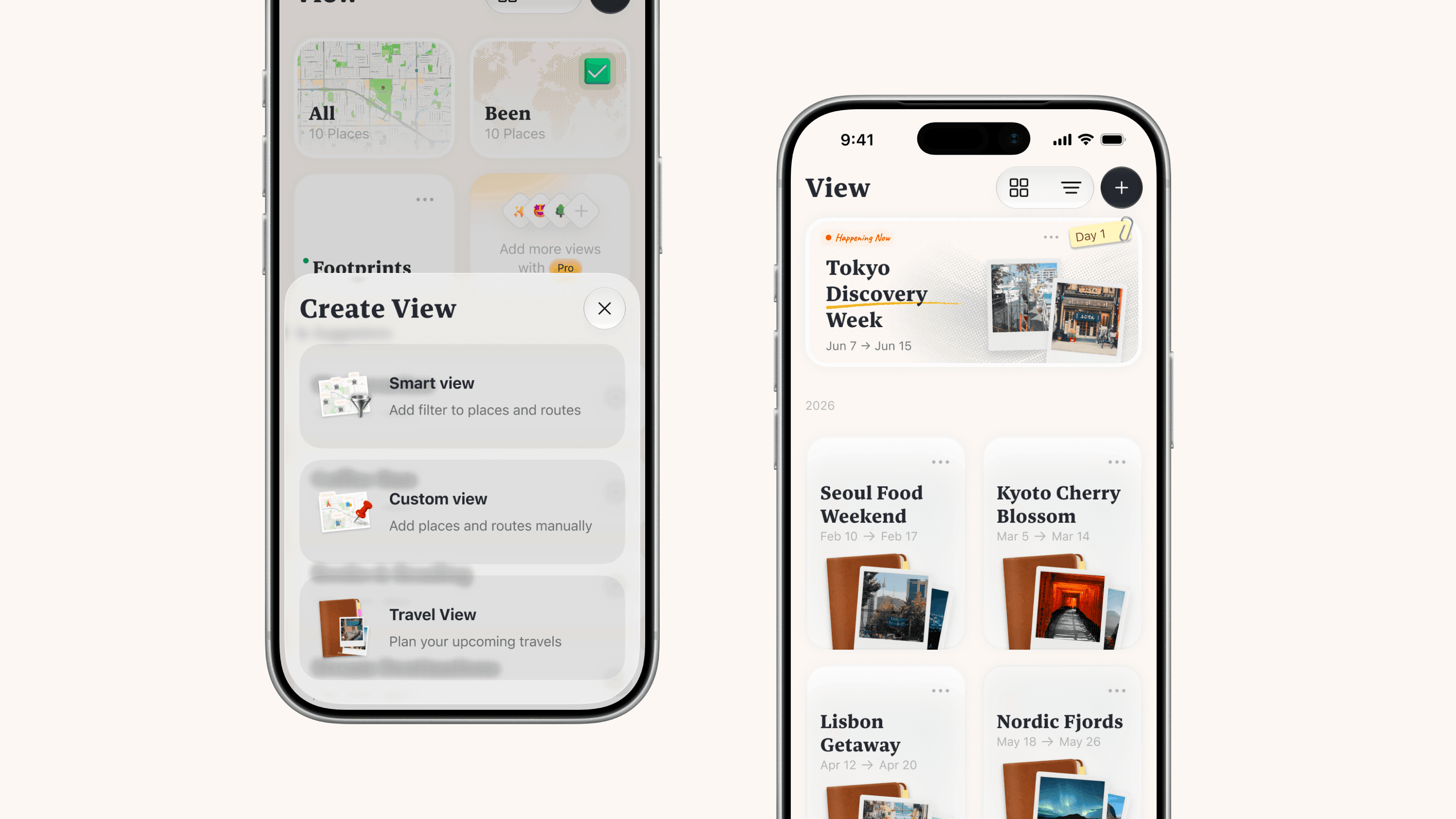
In Placify 2.0, we’ve added a new type of view: Travel View. As with other views, you can import those guides directly into it, turning them into places to consider and Place References to revisit as you decide where to go.
You can also use custom tags to organize those possibilities. Some places might be worth making a special detour for, while others might be nice to visit if you’re nearby. Give them different tags. There’s no need to assign every place to a date right away. For now, it’s enough to give those early ideas somewhere to live.
Planning each day
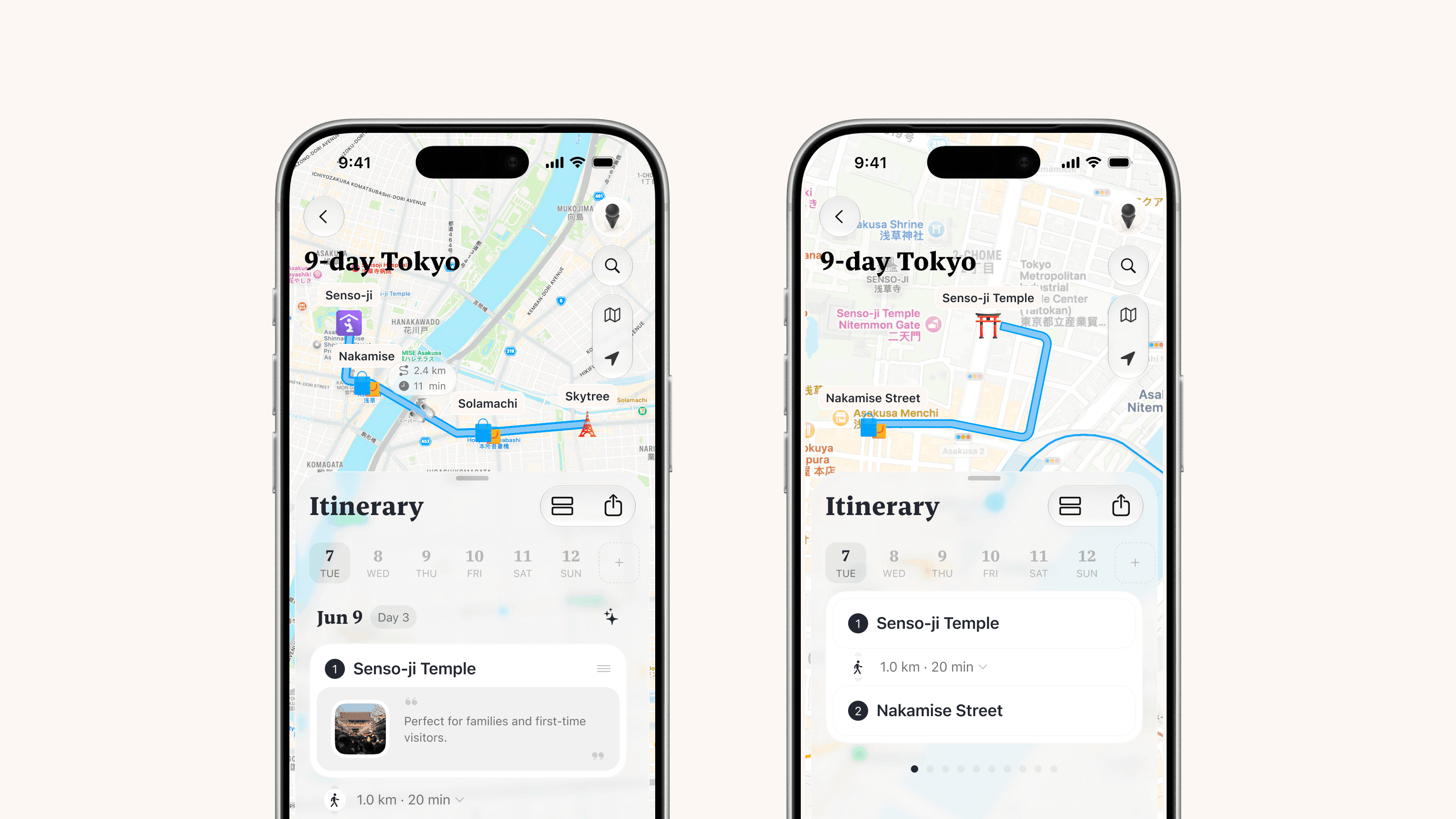
In a Travel View, the Itinerary tab takes the place of the Routes tab. Choose from the places you’re considering and add them to the day you’d like to visit. It’s a familiar way to plan, with everything organized by date.
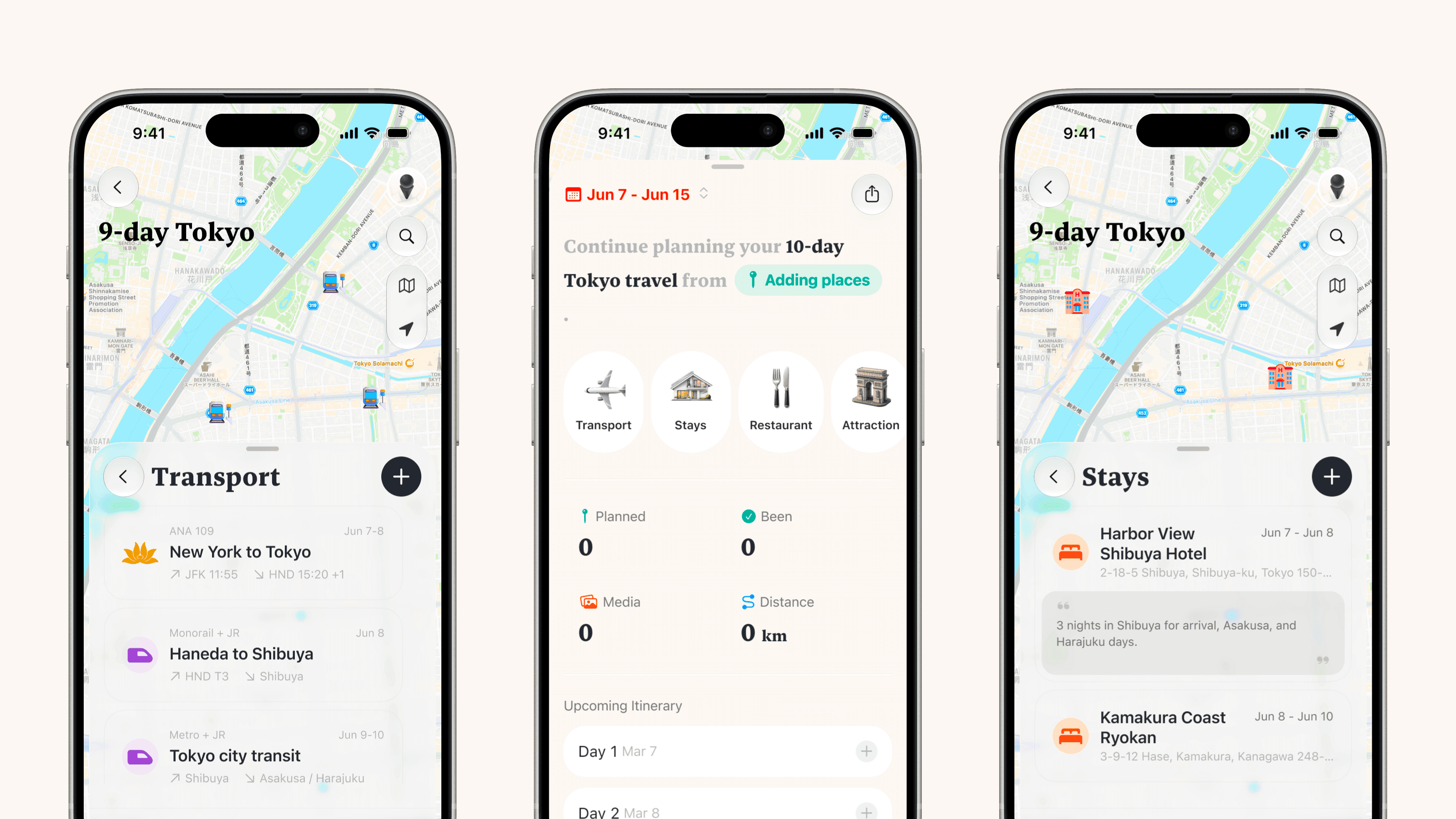
Transport and accommodation are part of those plans, too. You can add them through the relevant sections in Today, then include them in your daily itinerary to see everything together.
Transport often sets the timing for the journey, helping you leave enough room for getting from one place to another. Accommodation gives each day a place to begin and end. Save where you’re staying, along with your check-in and check-out dates, then plan your days around it.
With transport, accommodation, and the places you want to visit together, those few days start to take shape. You can see how much to plan for arrival day, when to leave time for moving between cities, and where each day will begin and end.
Sharing plans with the people coming along
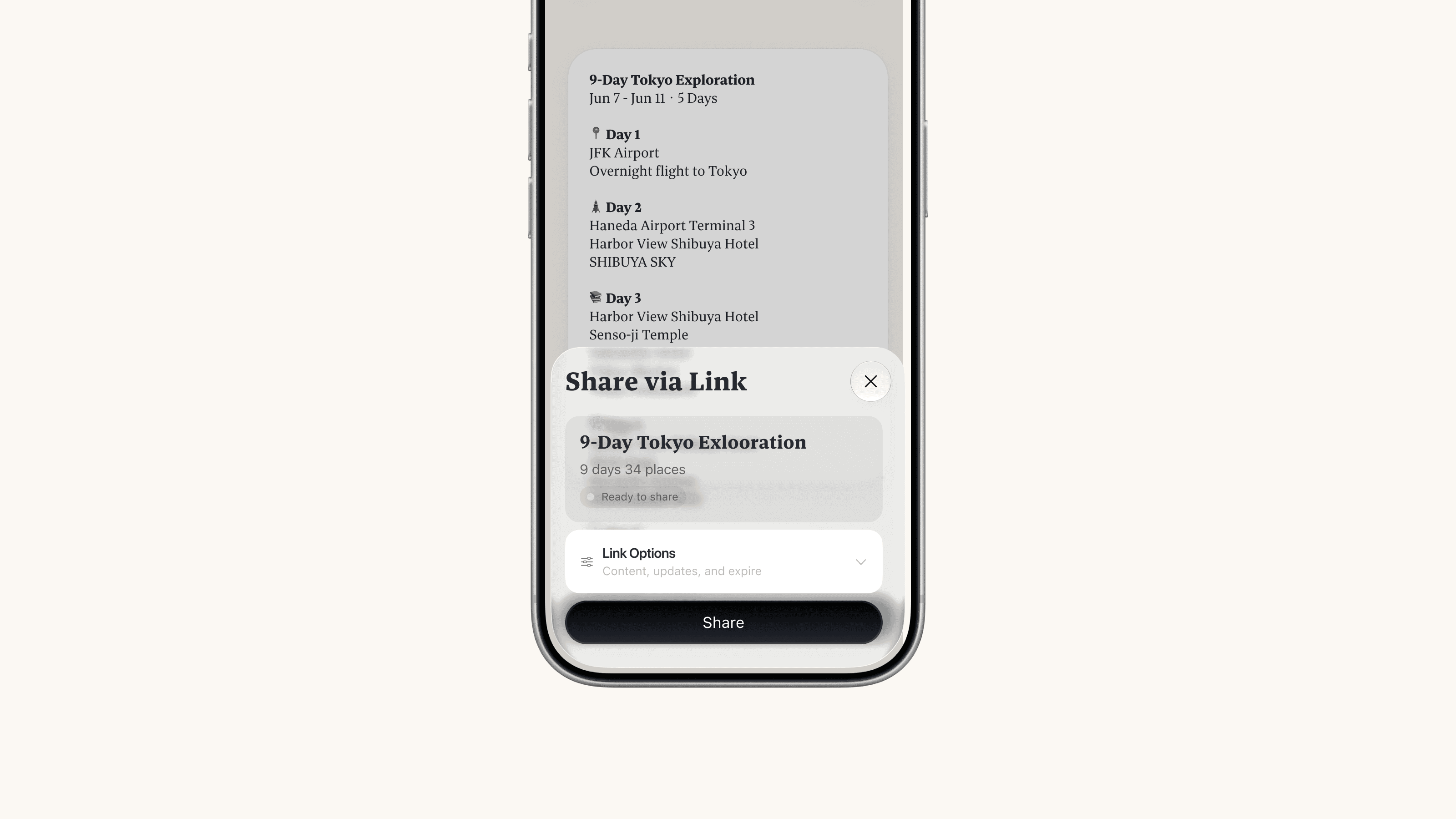
We introduced web sharing in version 1.9.1, and Travel Views support it too. Send a link, and the people traveling with you can see each day’s itinerary, transport, and accommodation whenever they need to. Before you leave or while you’re away, everyone can refer to the same plan as you discuss and adjust it. If your companions also use Placify, they can import the shared places into their own maps with a single tap.
On the road, focus on what’s next
Departure day is finally here, and the itinerary you spent time putting together starts to come in handy. But while we’re out exploring, we often just want a quick answer to one question: where to next?
That’s why we designed a dynamic card in the Today tab and called it Now. Based on the current time and your progress through the itinerary, it brings up the plans relevant to you at that moment. That might be an upcoming departure, a hotel you’re about to check into, or the next place on today’s itinerary. It can also suggest nearby places you haven’t added to the plan. After a morning at a museum, for example, you can check Now for the restaurant you picked for lunch. When it’s time to catch your ride, you can bring up the relevant transport details. As you go from one place to the next, the information in front of you changes with you.
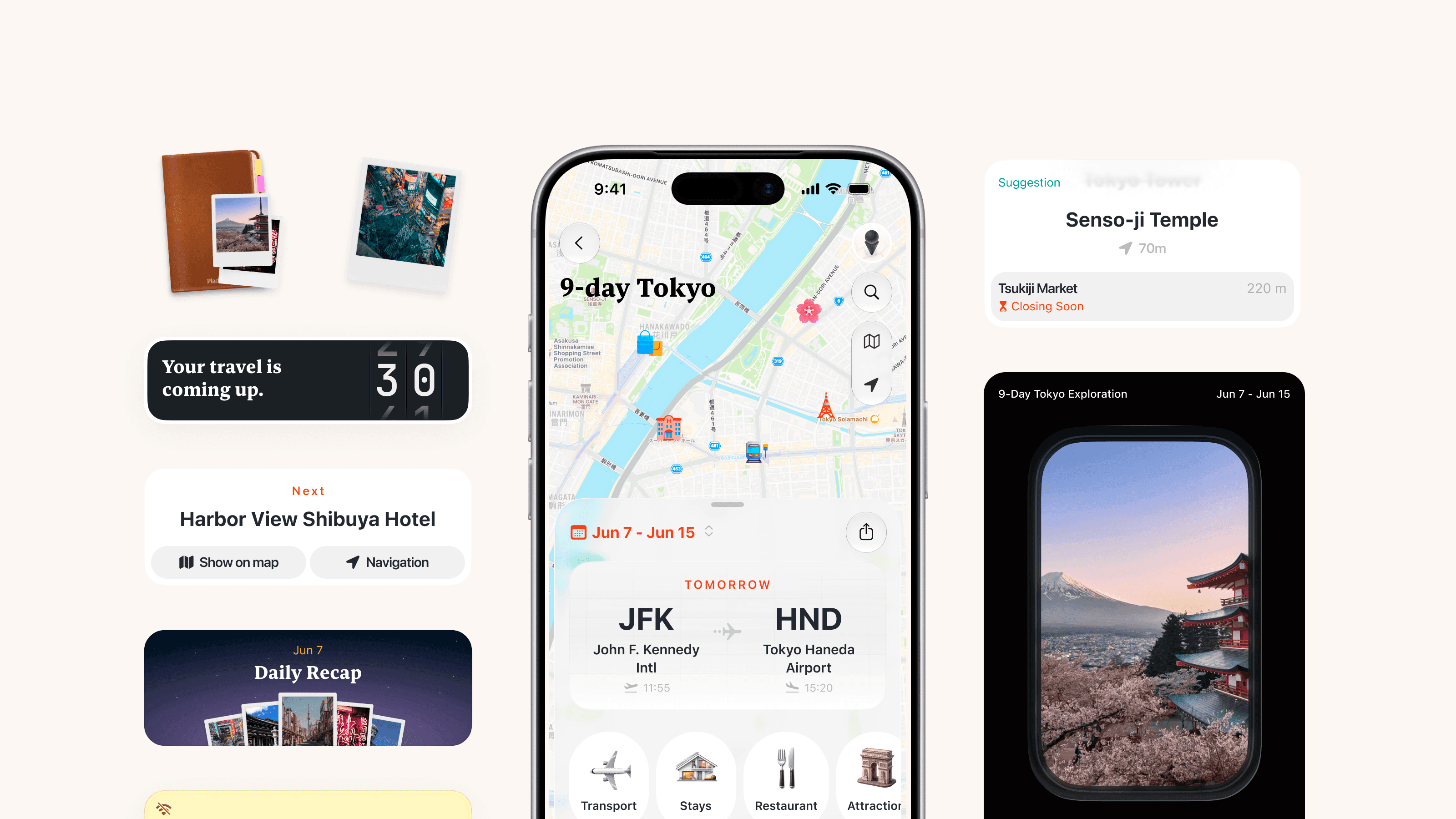
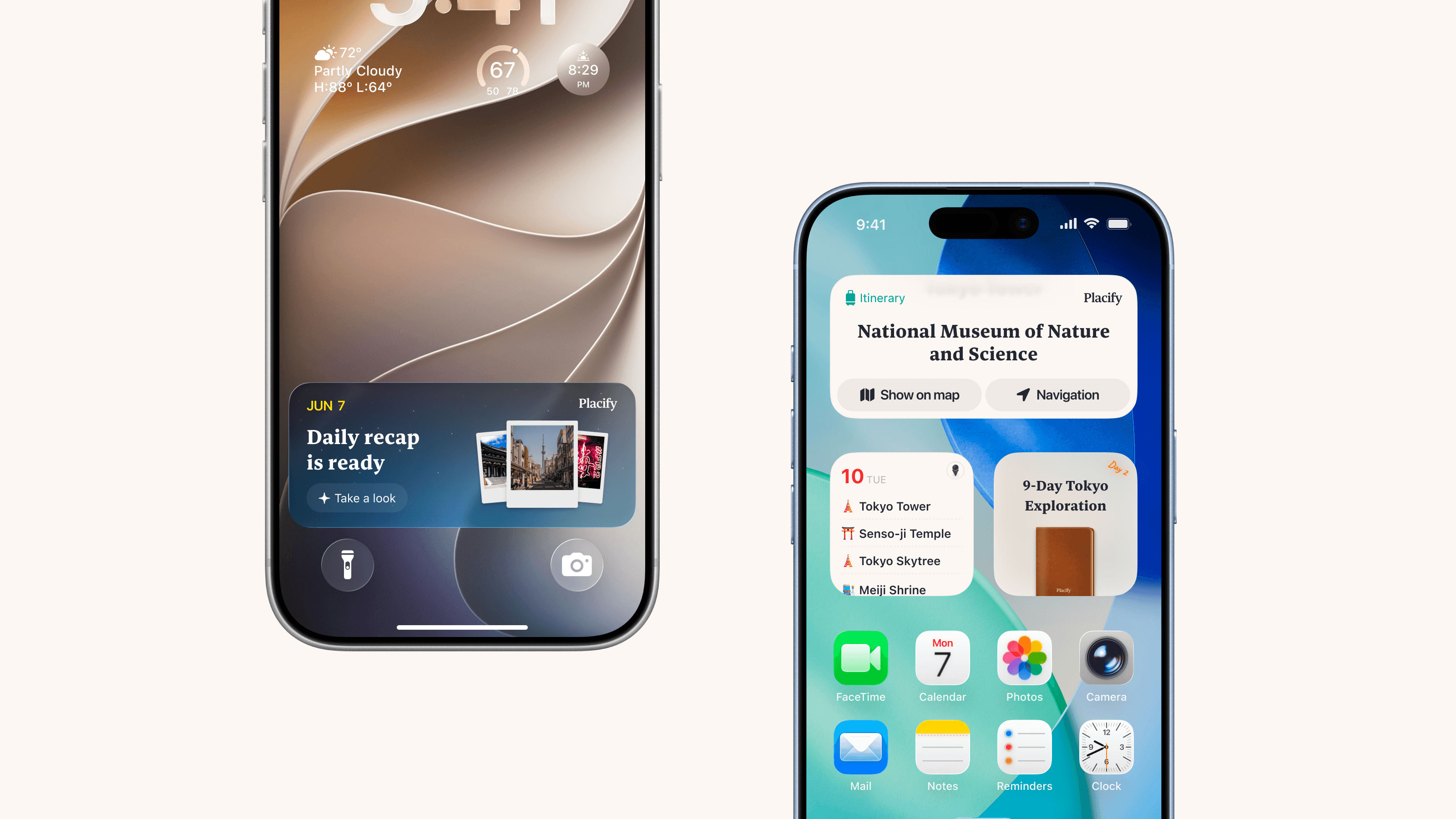
Now also supports Live Activities, bringing that information to the Lock Screen and Dynamic Island. As you step out of a museum or haul your luggage across town, a glance at your phone is enough to check the current plan.
You can also add your travel plans to the Home Screen as widgets, so the daily itinerary and today’s Now information are always close at hand, without opening Placify.
Placify gives you the tools to plan a detailed itinerary, yet once you’re traveling, we’re trying to help you spend less time in the itinerary. That might sound contradictory, but it’s exactly the experience we want to offer. More of your time should belong to the scenery in front of you and the people beside you.
At the end of the day, look back on where you’ve been
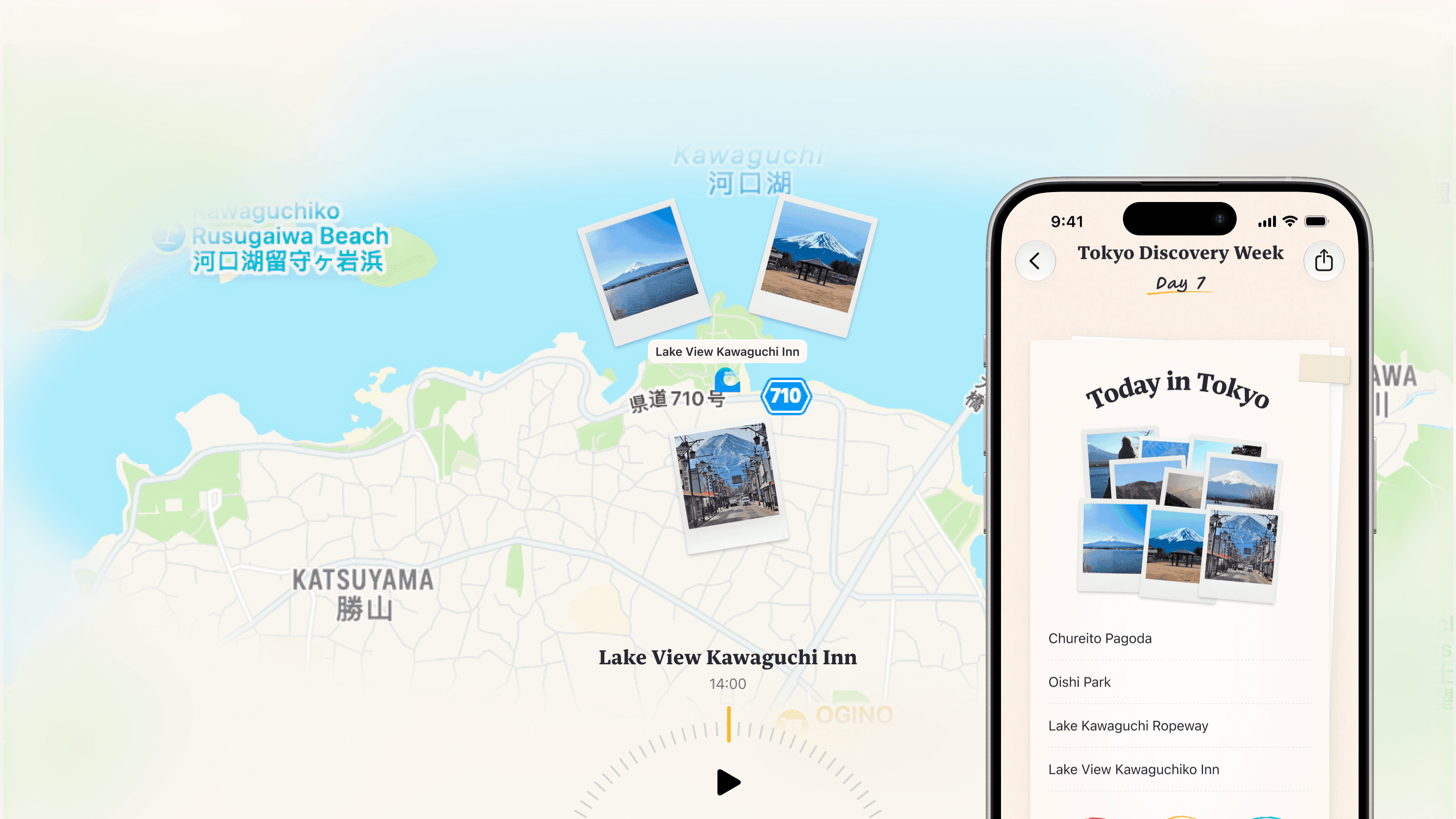
Back at your accommodation in the evening, you scroll through your photos. The morning’s museum, the restaurant where you had lunch, the neighborhood you explored in the afternoon: each comes back into view. Photos can bring back the moment you took them, but they don’t always show how the day unfolded from place to place. Placify’s daily recap brings together the places and photos from different points in your day, moving through them on the map as the recap plays. You can retrace how you went from one place to the next and see the moments you captured along the way.
Finding the stops you hadn’t added
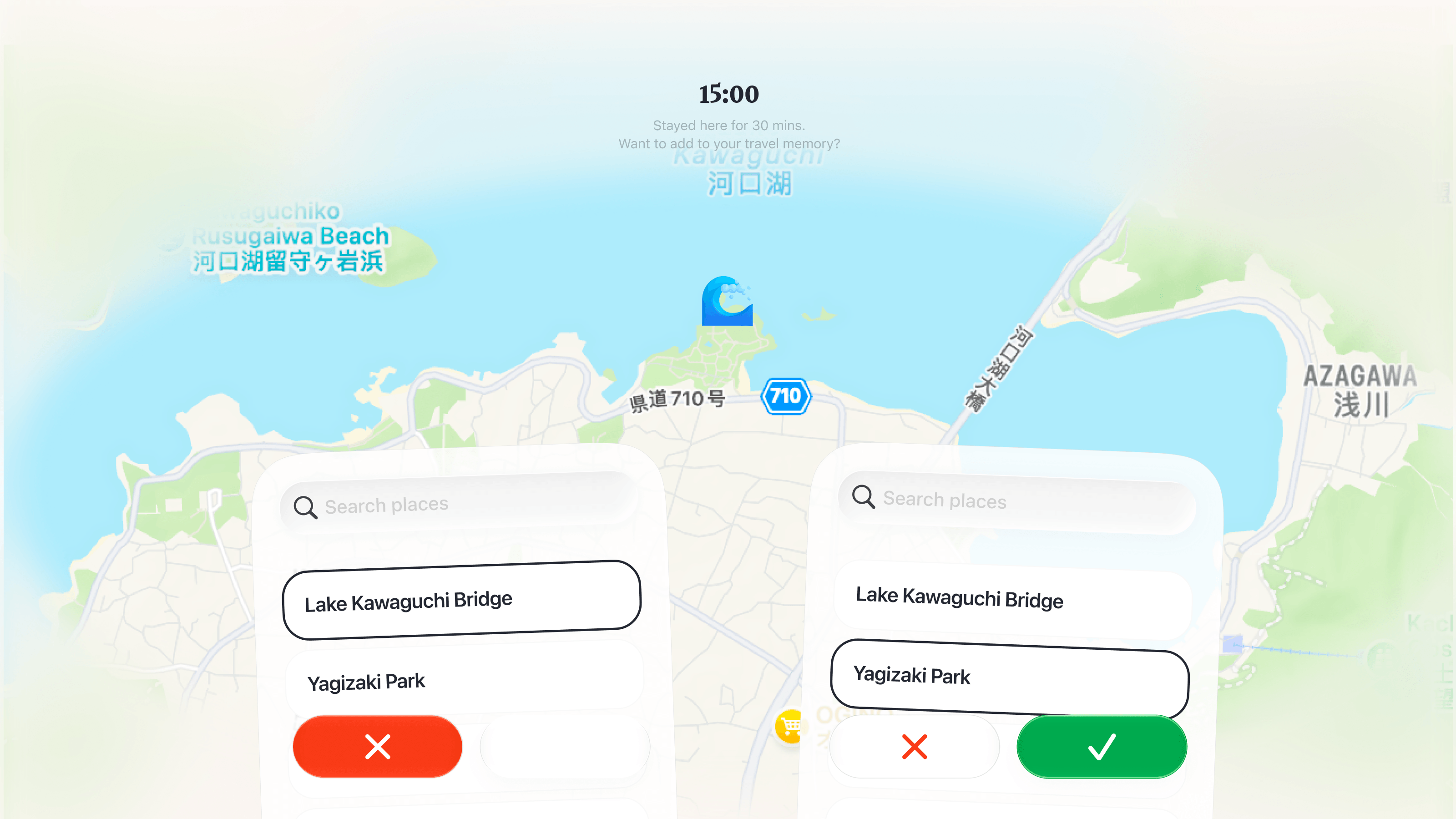
“The only constant is change” feels especially true when we travel. By the time you look back on a day, it may have unfolded a little differently from the original plan. Adding those extra places to the itinerary can feel like a lot to ask when you’re tired after a full day out. Using your locations and how long you stayed, Placify’s daily recap suggests places you may have visited but haven’t added. A quick look and a few swipes are all it takes to update the itinerary.
Earlier, we talked about how stressful it can be to plan every detail before leaving. This part of the daily recap lets you leave the plan a little looser and fill in the gaps with a few simple choices at the end of the day. It’s one of our favorite features.
Revisit the journey, one page at a time
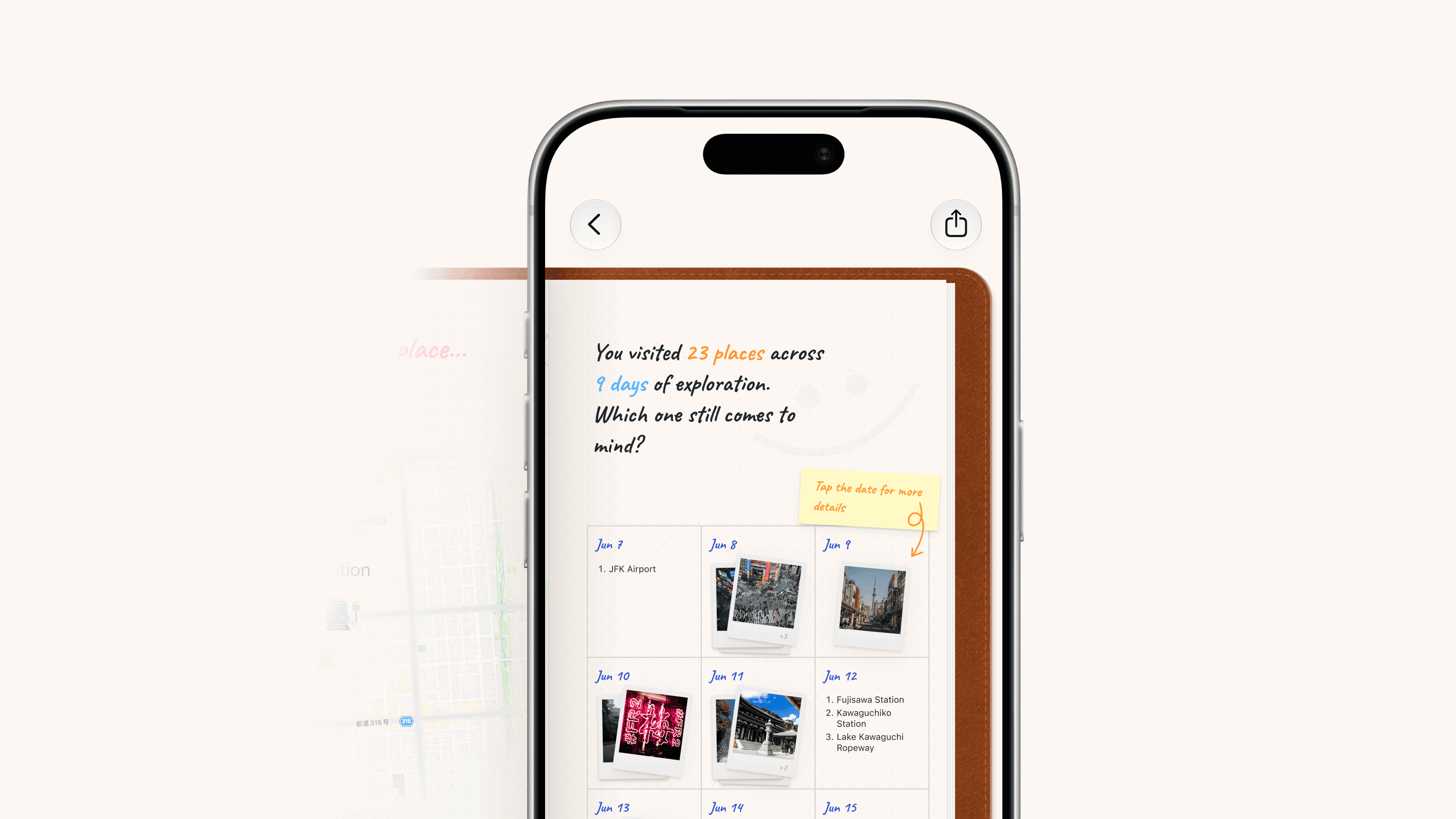
When you pack your bags on the last day and set off for home, the journey is nearly over. But an itinerary holds only plans and places. It can’t contain everything that happened along the way. We’ve created a recap of your whole journey that brings its places, routes, and photos together in a travel journal you can flip through. Open the cover and turn the pages to see those days again from a different perspective.
The journal starts with each day’s itinerary and photos, then brings out highlights we’ve found along the way. Some might be details you didn’t even notice at the time, such as the place where you took the most photos. These appear when there are relevant records to draw on. Before leaving, perhaps it was the scenery of a small town you were most looking forward to. Yet by the final page, you might discover that most of your photos came from a stretch of coast where you stopped on a whim.
A place you saved becomes part of an itinerary, then somewhere you can look back on through your own experiences. That’s the most meaningful change travel brings to the places you collect in Placify.
Beyond travel
Alongside Travel mode, Placify 2.0 brings a few other new features. They may have grown out of the needs of travel planning, but they’re just as useful for collecting and organizing places in everyday life.
Planning on a bigger screen
A phone is great for checking things on the go. But when we sit down to plan a few days away, we often want a bigger map and more room to see what’s around us. That’s especially true when we’re using multiple windows to browse guides and organize places at the same time. A larger screen makes that much more comfortable, and it’s something many of you have been waiting for.
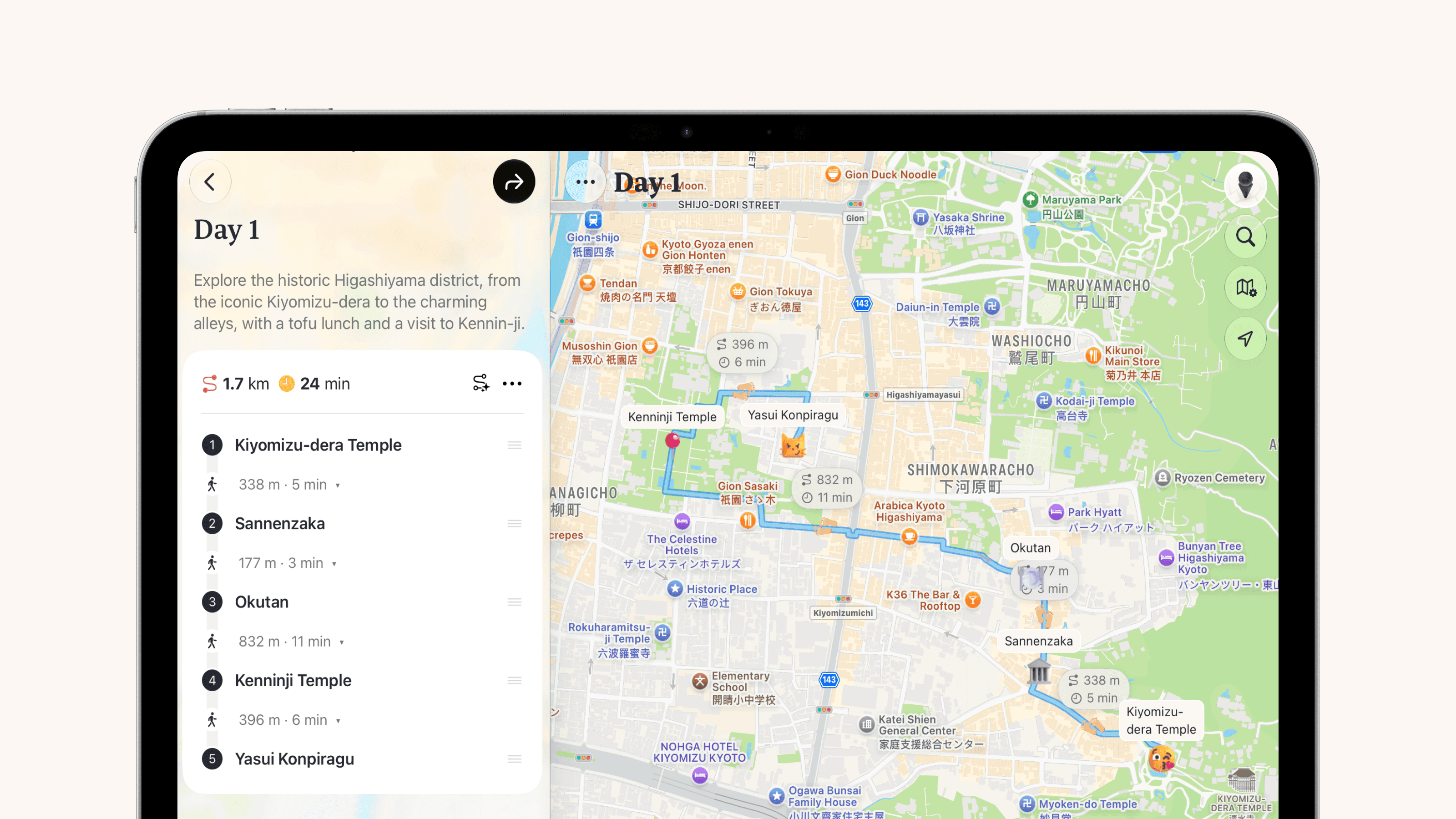
So, with Placify 2.0, we’re also introducing support for iPad. You can use a larger window to explore the map, organize places and routes, or take your time planning your next journey.
Thanks to Apple’s support for apps across platforms, Placify now has more room to spread out on macOS, too. The desktop experience still has plenty of room for improvement, but the difference it makes to getting things done is significant enough that we wanted to release it now and let you try it. You can reach for Placify while you’re out, then move to a more comfortable screen when you have time to sit down and organize.
Ask Siri about your places and travel plans
When a saved place comes to mind, or you want to check what’s next on your itinerary, you don’t always need to open Placify and browse through it. In regions where Apple Intelligence is available, you can now ask Siri directly about your saved places and travel plans in Placify. You might want to find restaurants you’ve saved in a particular city, or check a specific itinerary. Just ask. Siri uses the relevant information in Placify to answer, helping you find what you need more quickly as you’re getting ready to leave or while you’re on the road.
A final note
Before we started designing Travel mode, we had a lot of conversations and wrote down plenty of ideas. Looking back now, some have become features you can use today. Others still need more time out in the world, on real journeys, before we’ll know where to take them.
For us, building Placify 2.0 has felt like a journey of its own. We planned carefully, and plenty changed along the way. This article feels a little like our own recap of it all.
A place is a space we give meaning to. Until now, Placify has helped you keep the places you want to go. Now, when you’re ready to set out, it helps you bring those places together and weave them into your life, give them meaning, and come home with memories you can revisit.
We’ll keep improving Travel mode. We’d also love to hear how it fits into your own travels: what feels easy, and where things still feel cumbersome. Those specific experiences will help us work out where Placify should go next.
We hope your next journey includes a few places you saved long ago and finally get to visit.
Happy travels.
Placify 2.0 is here. It’s our biggest update since launch, and after five months of work, we’re introducing Travel mode in Placify, a feature we’ve been thinking about since the very beginning.
From planning before you leave, to checking what’s next while you’re away, to looking back on the places you’ve been, Placify 2.0 helps turn the places you’ve saved into part of a journey.
Why travel?
How we got here
Until now, our work on Placify has focused on helping you collect places and revisit the memories around them. You can import places from all kinds of sources, organize related content into Place References, and see photos taken nearby. Together, these details help you remember why you saved a place in the first place. But a place is worth more than saving. It’s somewhere you can go, adding your own experiences and memories along the way. Travel is the best way to make use of the places we’ve collected, and it’s something we couldn’t leave out of Placify.
What makes travel special is how it brings places and routes together within a shared stretch of time. You leave on one day and return on another. The stops and movement in between form a complete experience. Routes already let us connect places. Travel gives those places a shared time and story, too.
More than travel planning
Imagining a journey is always exciting. But once we start planning, we often find a lot of questions waiting for us. Which places make sense to visit on the same day? Where would it be convenient to stay? Once we factor in travel time, are we trying to fit too much into a day? How do the people we’re traveling with like to spend their time? Even a journey we’ve been looking forward to can start to feel stressful as the research and decisions pile up.
Once transport, accommodation, and each day’s places are in the itinerary, it can feel as though the preparation is done. But that’s only part of the picture. A finished plan is just the beginning of a journey, and we didn’t want Placify’s role to end there.
Once you’re on your way, the help you need becomes more specific. You might have just arrived and want to find where you’re staying tonight, or crossed a place off your list and want to see what’s next. Plans change, too. Unexpected weather might send you somewhere else for the afternoon, while a little shop you happen to pass might persuade you to linger. In those moments, what matters is finding the information you need easily and keeping your plans in step with your day. “Where to next?” may be the question we ask most often when we travel.
By the end of the day, the places you’ve actually been may look a little different from the plan. Those spontaneous stops and the photos you took along the way are part of the experience, too. They deserve to be kept.
And once we’re home, we often want to look back: where we went over those few days, which café we lingered in, or where we took a favorite photo. As time passes, the photos remain, but the details connecting them can start to fade. An itinerary alone can’t capture all of that. Placify can help bring those experiences back, so you can return to them whenever you like.
That’s why, as we designed Travel mode, we kept reminding ourselves: Placify should be there for the whole journey.
Placify for Travel
Creating a Travel View
Once we’ve decided where to go next, we usually start by creating a Travel View, then browsing guides and recommendations to get a feel for the destination. We may not know what we’ll do each day yet, but a restaurant we like or an interesting little shop is enough to make us think, “Maybe we could go here.”
In Placify 2.0, we’ve added a new type of view: Travel View. As with other views, you can import those guides directly into it, turning them into places to consider and Place References to revisit as you decide where to go.
You can also use custom tags to organize those possibilities. Some places might be worth making a special detour for, while others might be nice to visit if you’re nearby. Give them different tags. There’s no need to assign every place to a date right away. For now, it’s enough to give those early ideas somewhere to live.
Planning each day
In a Travel View, the Itinerary tab takes the place of the Routes tab. Choose from the places you’re considering and add them to the day you’d like to visit. It’s a familiar way to plan, with everything organized by date.
Transport and accommodation are part of those plans, too. You can add them through the relevant sections in Today, then include them in your daily itinerary to see everything together.
Transport often sets the timing for the journey, helping you leave enough room for getting from one place to another. Accommodation gives each day a place to begin and end. Save where you’re staying, along with your check-in and check-out dates, then plan your days around it.
With transport, accommodation, and the places you want to visit together, those few days start to take shape. You can see how much to plan for arrival day, when to leave time for moving between cities, and where each day will begin and end.
Sharing plans with the people coming along
We introduced web sharing in version 1.9.1, and Travel Views support it too. Send a link, and the people traveling with you can see each day’s itinerary, transport, and accommodation whenever they need to. Before you leave or while you’re away, everyone can refer to the same plan as you discuss and adjust it. If your companions also use Placify, they can import the shared places into their own maps with a single tap.
On the road, focus on what’s next
Departure day is finally here, and the itinerary you spent time putting together starts to come in handy. But while we’re out exploring, we often just want a quick answer to one question: where to next?
That’s why we designed a dynamic card in the Today tab and called it Now. Based on the current time and your progress through the itinerary, it brings up the plans relevant to you at that moment. That might be an upcoming departure, a hotel you’re about to check into, or the next place on today’s itinerary. It can also suggest nearby places you haven’t added to the plan. After a morning at a museum, for example, you can check Now for the restaurant you picked for lunch. When it’s time to catch your ride, you can bring up the relevant transport details. As you go from one place to the next, the information in front of you changes with you.
Now also supports Live Activities, bringing that information to the Lock Screen and Dynamic Island. As you step out of a museum or haul your luggage across town, a glance at your phone is enough to check the current plan.
You can also add your travel plans to the Home Screen as widgets, so the daily itinerary and today’s Now information are always close at hand, without opening Placify.
Placify gives you the tools to plan a detailed itinerary, yet once you’re traveling, we’re trying to help you spend less time in the itinerary. That might sound contradictory, but it’s exactly the experience we want to offer. More of your time should belong to the scenery in front of you and the people beside you.
At the end of the day, look back on where you’ve been
Back at your accommodation in the evening, you scroll through your photos. The morning’s museum, the restaurant where you had lunch, the neighborhood you explored in the afternoon: each comes back into view. Photos can bring back the moment you took them, but they don’t always show how the day unfolded from place to place. Placify’s daily recap brings together the places and photos from different points in your day, moving through them on the map as the recap plays. You can retrace how you went from one place to the next and see the moments you captured along the way.
Finding the stops you hadn’t added
“The only constant is change” feels especially true when we travel. By the time you look back on a day, it may have unfolded a little differently from the original plan. Adding those extra places to the itinerary can feel like a lot to ask when you’re tired after a full day out. Using your locations and how long you stayed, Placify’s daily recap suggests places you may have visited but haven’t added. A quick look and a few swipes are all it takes to update the itinerary.
Earlier, we talked about how stressful it can be to plan every detail before leaving. This part of the daily recap lets you leave the plan a little looser and fill in the gaps with a few simple choices at the end of the day. It’s one of our favorite features.
Revisit the journey, one page at a time
When you pack your bags on the last day and set off for home, the journey is nearly over. But an itinerary holds only plans and places. It can’t contain everything that happened along the way. We’ve created a recap of your whole journey that brings its places, routes, and photos together in a travel journal you can flip through. Open the cover and turn the pages to see those days again from a different perspective.
The journal starts with each day’s itinerary and photos, then brings out highlights we’ve found along the way. Some might be details you didn’t even notice at the time, such as the place where you took the most photos. These appear when there are relevant records to draw on. Before leaving, perhaps it was the scenery of a small town you were most looking forward to. Yet by the final page, you might discover that most of your photos came from a stretch of coast where you stopped on a whim.
A place you saved becomes part of an itinerary, then somewhere you can look back on through your own experiences. That’s the most meaningful change travel brings to the places you collect in Placify.
Beyond travel
Alongside Travel mode, Placify 2.0 brings a few other new features. They may have grown out of the needs of travel planning, but they’re just as useful for collecting and organizing places in everyday life.
Planning on a bigger screen
A phone is great for checking things on the go. But when we sit down to plan a few days away, we often want a bigger map and more room to see what’s around us. That’s especially true when we’re using multiple windows to browse guides and organize places at the same time. A larger screen makes that much more comfortable, and it’s something many of you have been waiting for.
So, with Placify 2.0, we’re also introducing support for iPad. You can use a larger window to explore the map, organize places and routes, or take your time planning your next journey.
Thanks to Apple’s support for apps across platforms, Placify now has more room to spread out on macOS, too. The desktop experience still has plenty of room for improvement, but the difference it makes to getting things done is significant enough that we wanted to release it now and let you try it. You can reach for Placify while you’re out, then move to a more comfortable screen when you have time to sit down and organize.
Ask Siri about your places and travel plans
When a saved place comes to mind, or you want to check what’s next on your itinerary, you don’t always need to open Placify and browse through it. In regions where Apple Intelligence is available, you can now ask Siri directly about your saved places and travel plans in Placify. You might want to find restaurants you’ve saved in a particular city, or check a specific itinerary. Just ask. Siri uses the relevant information in Placify to answer, helping you find what you need more quickly as you’re getting ready to leave or while you’re on the road.
A final note
Before we started designing Travel mode, we had a lot of conversations and wrote down plenty of ideas. Looking back now, some have become features you can use today. Others still need more time out in the world, on real journeys, before we’ll know where to take them.
For us, building Placify 2.0 has felt like a journey of its own. We planned carefully, and plenty changed along the way. This article feels a little like our own recap of it all.
A place is a space we give meaning to. Until now, Placify has helped you keep the places you want to go. Now, when you’re ready to set out, it helps you bring those places together and weave them into your life, give them meaning, and come home with memories you can revisit.
We’ll keep improving Travel mode. We’d also love to hear how it fits into your own travels: what feels easy, and where things still feel cumbersome. Those specific experiences will help us work out where Placify should go next.
We hope your next journey includes a few places you saved long ago and finally get to visit.
Happy travels.
Made by ♥ Placify Team
© 2026 Whitesspace Sdn. Bhd.
Made by ♥ Placify Team
© 2026 Whitesspace Sdn. Bhd.
Made by ♥ Placify Team
© 2026 Whitesspace Sdn. Bhd.